
Interactive Periodic Table: 4 Free Online Tools
Discover the best free interactive periodic tables for studying chemistry: Ptable, WebElements, Fisher Scientific, and INL.
In 1871, Dmitri Mendeleev did something no scientist had dared to do: he left empty gaps in his periodic table and accurately predicted the properties of elements that didn’t yet exist.
For “eka-silicon” – an element no one had ever seen – he predicted an atomic mass of 72.64, a density of 5.5 g/cm3, and a gray color. Fifteen years later, when Germanium was discovered, the actual data were: atomic mass 72.63, density 5.35 g/cm3, and color gray. Chilling accuracy for someone whose only tools were pencil, paper, and brilliant intuition.
Fun fact: Mendeleev correctly predicted the properties of Gallium (1875), Scandium (1879), and Germanium (1886) years before they were discovered. His predictions included atomic mass, density, boiling point of their compounds, and even the formula of their oxides. Germanium was so accurate that the chemist who discovered it, Clemens Winkler, wrote that it was “the most striking proof of the validity of the periodic theory.”
Today, that same table Mendeleev drew by hand lives in your browser – but with superpowers. Interactive periodic tables allow you to explore each element in depth: orbitals, isotopes, oxidation states, trends, and data that no textbook can present with the same clarity.
In this article you’ll discover 4 free tools that turn the periodic table into a visual and interactive experience, ideal for students, teachers, and anyone who wants to truly understand chemistry.
The 4 Best Free Interactive Periodic Tables in 2026
Not all online periodic tables are created equal. Some just show the atomic number and symbol – basically a PDF with colors. The tools you’re about to see go much further: they let you interact, filter, compare, and visualize chemical data in real time.
| Tool | Best For | Level | Price |
|---|---|---|---|
| Ptable | Complete interactive exploration | Intermediate / Advanced | Free |
| Fisher Scientific | Quick and visual reference | Beginner | Free |
| WebElements | Research and extensive data | Advanced | Free |
| INL (Idaho National Lab) | Formal education and teaching | All levels | Free |
Ptable: The Most Complete Interactive Periodic Table on the Internet
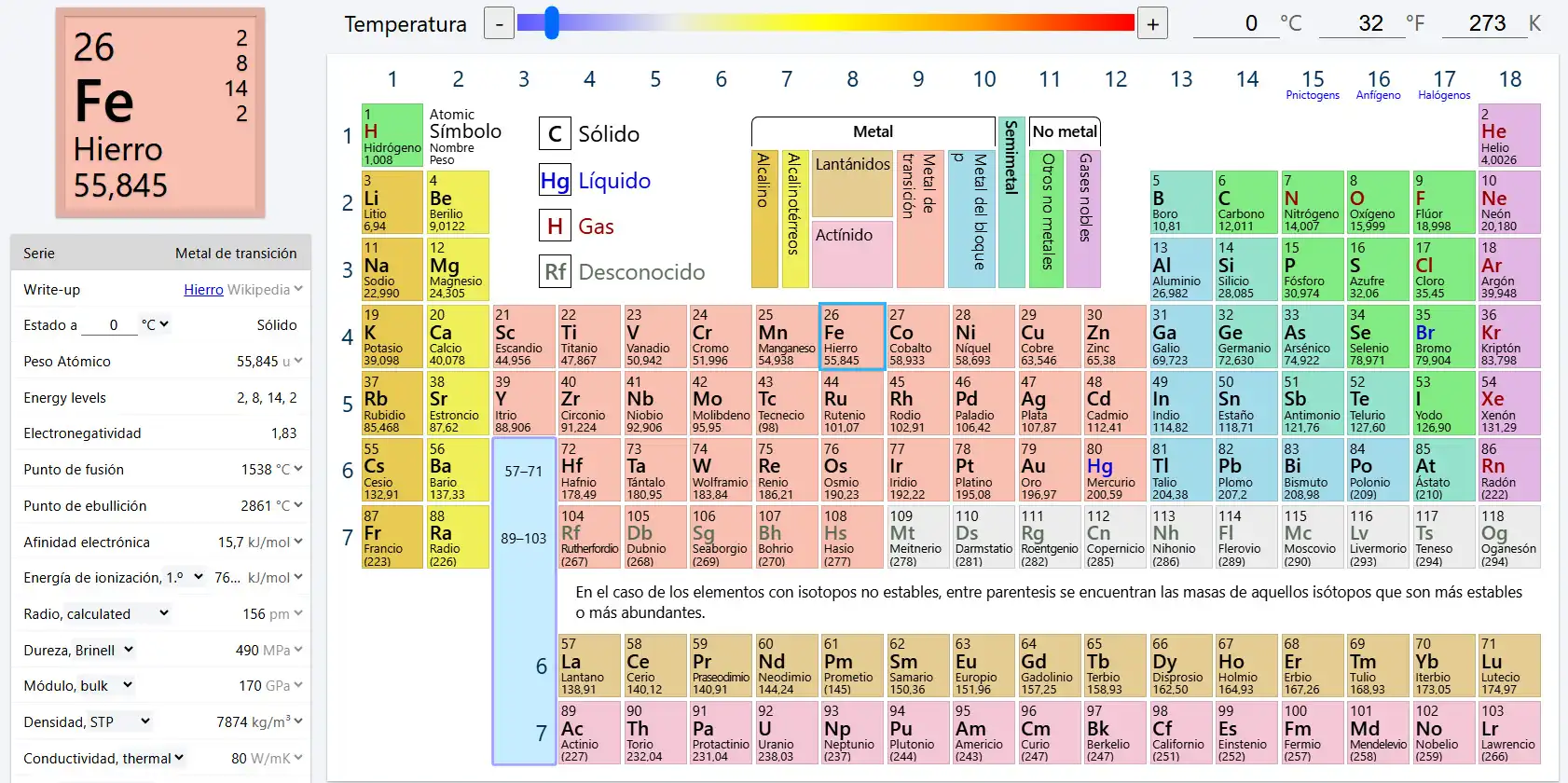
Ptable is probably the most powerful interactive periodic table in existence. Created by Michael Dayah, this tool has been updated and refined for over two decades – and it shows.
What Makes Ptable Different from Any Other Periodic Table?
What sets Ptable apart is its ability to transform the entire table based on the type of data you need to look up. It’s not a static table with tooltips: it’s a dynamic visualization system that changes views with a single click.
Available views include:
- Properties: Atomic mass, density, melting point, boiling point, electronegativity, and atomic radius – with color gradients that let you identify trends at a glance
- Electrons: Complete electron configuration of each element, with interactive orbital diagrams
- Oxidation states: Visualize all possible states of each element, color-coded
- Isotopes: Data for every known isotope, including stability and natural abundance
- Compounds: Explore the most common compounds of each element
For teachers: Ptable is available in more than 50 languages, including Spanish. You can project it in class and switch views in real time while explaining a topic. It also offers printable PDF versions.
How to Use Ptable to Study Periodic Trends
One of the most useful features for students is the visualization of periodic trends. When you select a property like electronegativity, the entire table is colored with a gradient that clearly shows how it increases or decreases across periods and groups.
This turns an abstract concept – “electronegativity increases from left to right and from bottom to top” – into something you see immediately. It’s the difference between memorizing a rule and understanding it.
Fisher Scientific: Visual Periodic Table for Quick Lookups
Fisher Scientific is known worldwide as a supplier of laboratory equipment and reagents. Its digital periodic table maintains that same philosophy of practicality: clean design, quick access, and no distractions.
Color-Coded Design for Identifying Element Groups
The Fisher Scientific table uses a color-coding system that classifies all 118 elements by chemical families: alkali metals, transition metals, halogens, noble gases, and more. Each group has its distinctive color, making immediate visual identification easy.
By clicking on any element you can view:
- Atomic number and symbol
- Updated atomic weight
- Electron configuration
- Full name of the element
Who Is the Fisher Scientific Table Ideal For?
This tool is perfect if you need a quick and reliable reference. It doesn’t have the depth of Ptable or the breadth of WebElements, but it makes up for it with clarity and speed. If you’re a high school student or just starting with general chemistry, Fisher Scientific gives you exactly what you need without overwhelming you with advanced data.
WebElements: The Most Extensive Chemical Elements Database
WebElements was created by Mark Winter, a chemistry professor at the University of Sheffield, and is one of the oldest and most respected online periodic tables on the Internet – active since 1993.
Unique Visual Styles: Standard, Spiral, and Circular Tables
What makes WebElements unique is that it doesn’t limit itself to the classic rectangular layout. It offers multiple visual representations of the elements:
- Standard table: The traditional 18-column layout everyone knows
- Spiral table: Organizes elements in a continuous spiral that highlights the periodicity of properties
- Circular table: A radial representation that offers a completely different perspective on the relationships between elements
These alternative visualizations aren’t just aesthetic – they help you understand that periodicity is a continuous phenomenon, not a rigid grid.
Data Depth for Research and Academic Papers
Each element in WebElements has a dedicated page with exhaustive information:
- History of discovery and name etymology
- Detailed physical and chemical properties
- Crystal structure and atomic radii
- Emission spectra
- Thermodynamic data
- Abundance in the Earth’s crust, oceans, and universe
- Industrial and biological uses
For research papers: WebElements cites its sources with academic rigor. Every data point includes a bibliographic reference, making it a source cited in scientific articles worldwide.
INL: Idaho National Laboratory’s Periodic Table for Education
The periodic table from the Idaho National Laboratory (INL) was developed by one of the national laboratories of the U.S. Department of Energy – the same institution that researches nuclear energy, advanced materials, and energy security.
Up-to-Date Scientific Information Backed by a National Laboratory
The INL’s institutional backing guarantees that the data presented is updated according to IUPAC standards (International Union of Pure and Applied Chemistry). This sets it apart from periodic tables created by independent developers, which sometimes feature outdated or unverified data.
For each element, the INL table offers:
- Fundamental atomic properties with verified data
- History and discovery of each element
- Practical applications in industry and research
- Safety and handling data
Ideal Resource for Teachers and STEM Education Programs
The INL designed this tool specifically with the educational context in mind. Teachers can use it as a classroom support resource thanks to its clear presentation and institutional scientific backing.
- Information structured in a didactic, not encyclopedic way
- Accessible language that doesn’t sacrifice technical precision
- Backing from a laboratory with decades of materials science research
If you’re interested in how to integrate technological tools into teaching, you may want to check out our guide on the ECity simulator for energy education.
Detailed Comparison: Ptable vs Fisher Scientific vs WebElements vs INL
To help you choose the right tool for your needs, this table summarizes the key differences:
| Feature | Ptable | Fisher Scientific | WebElements | INL |
|---|---|---|---|---|
| Dynamic views | Yes (multiple) | No | Yes (spiral, circular) | No |
| Isotopes | Yes | No | Yes | Limited |
| Oxidation states | Yes (visual) | No | Yes (data) | Yes |
| Interactive orbitals | Yes | No | Yes | No |
| Spanish language | Yes (50+ languages) | No (English) | No (English) | No (English) |
| Data depth | High | Basic | Very high | Medium-High |
| Institutional backing | Independent | Scientific company | University | National laboratory |
| Best for | Interactive study | Quick reference | Research | Teaching |
| Price | Free | Free | Free | Free |
Which Interactive Periodic Table to Choose Based on Your Profile?
There is no universally “best” periodic table – it depends on who you are and what you need:
If You’re a High School Student
Start with Fisher Scientific for quick lookups and get familiar with Ptable for studying periodic trends. The combination of both covers everything you need for exams and assignments.
If You’re a University Student or Researcher
WebElements is your go-to tool. Its data depth, bibliographic references, and alternative visualizations make it ideal for academic work. Complement it with Ptable for quick trend visualizations.
If You’re a Science Teacher
INL offers the institutional backing you need to cite reliable sources. Ptable is unbeatable for projecting in class and explaining concepts visually and interactively. If you also use simulators in your teaching, tools like Wokwi for electronic circuits can complement your hands-on approach.
If You Just Need a Quick Lookup
Fisher Scientific or Ptable – open either one, search for your element, and you’ll have the answer in seconds.
Is It Worth Using Interactive Periodic Tables in 2026?
Mendeleev built his table with 63 elements and a notebook. Today we have 118 confirmed elements and tools that let you explore each one of them in a depth that would have left Mendeleev himself speechless.
Interactive periodic tables aren’t a technological whim – they’re a natural evolution of how chemistry is learned and taught. Seeing an electronegativity gradient teaches more than memorizing the rule. Exploring an element’s isotopes teaches more than reading a list. Rotating a spiral table teaches more about periodicity than any static diagram.
The four tools in this article are free, accessible from any browser, and require no installation. There’s no excuse to keep studying chemistry with a periodic table that won’t let you click.
Open Ptable right now and start exploring the elements like never before.